
Release
Contents
1. Release#
1.1. Release v1.3.3#
Modify default scene name to
default.Change the default background.
const appRenderer = new Copper.Renderer(bg);
const defaultScene = appRenderer.getCurrentScene();
console.log(defaultScene.sceneName);
The result should be "default".
1.2. Release v1.3.4#
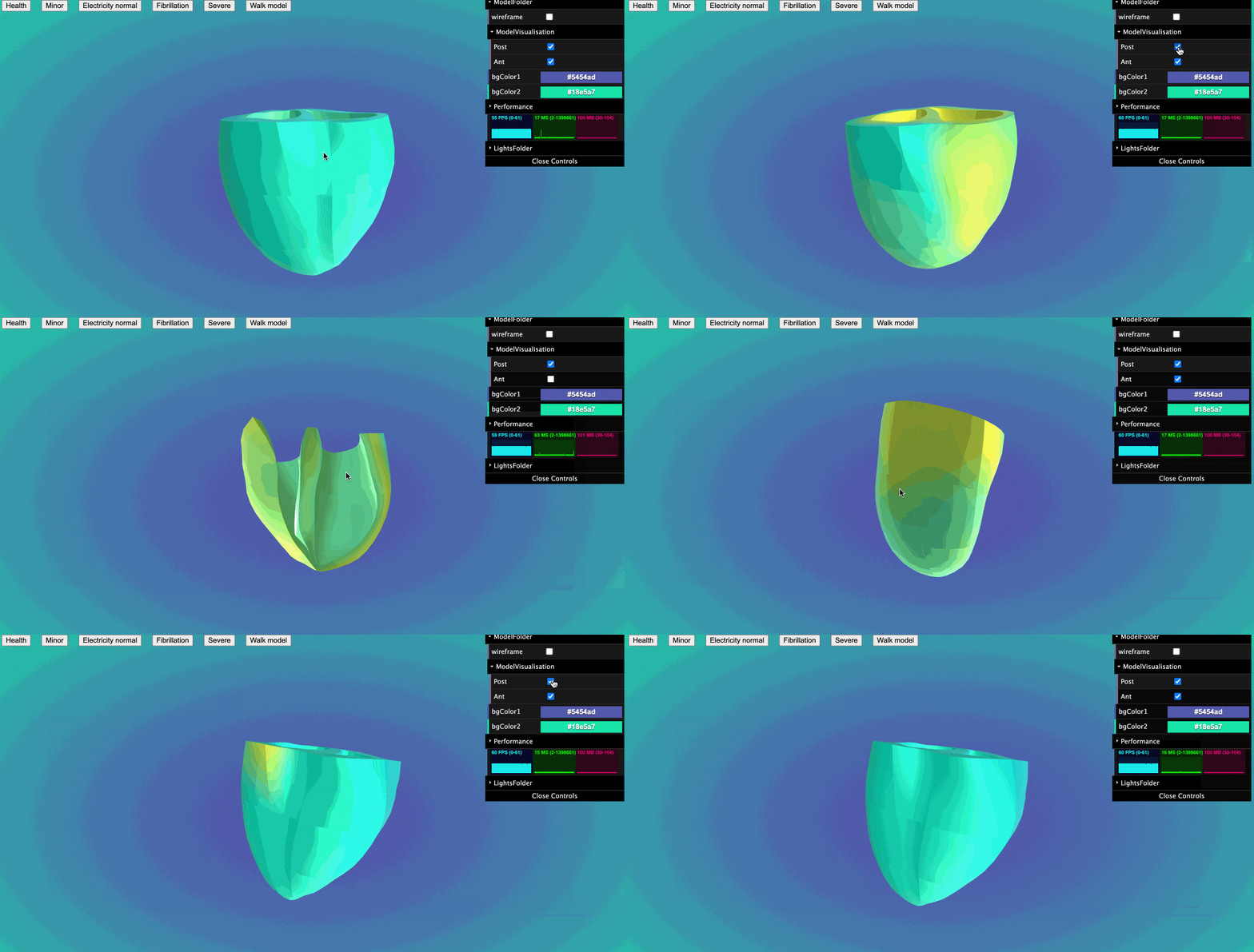
Add a method that can show/hide child mesh.
let scene = appRenderer.createScene(name);
if (child.isMesh) {
  scene.updateModelChildrenVisualisation(child);
}
Update GUI, allows user to show and hide child mesh under ModelFolder->ModelVisualisation folder.
Demo:
1.3. Release v1.4.0#
add camera control in base GUI.
pickModel
use raycaster to select model.
it has a callback function and a optional array parameter to sieve out models that users don’t want.
callback function:it will give the select mesh.see
tutorial - pick model.
add a callback funtion in loadGltf function.
In the callback funtion, you can get your
gltf model.
change class
RenderertocopperRendererchange class
ScenetocopperScene
1.4. Release v1.4.1#
optimise pickModel function.
1.5. Release v1.4.2#
modified pickModel callback function.
if is picked the mesh will be returned. if picked null, the mesh will return undefined.
1.6. Release v1.4.3#
export copperScene type –
copperSceneexport viewpoint type –
CameraViewPointadd updateCamera function
same as loadView function
1.7. Release v1.4.4#
setViewPoint(camera: THREE.PerspectiveCamera,target?: number[])
return viewPoint
getViewPoint()
Returns the default viewpoint, i.e. the viewpoint that was available when the user loaded the model.
resetView()
1.8. Release v1.4.5#
add
isHalfedattribute in copperScenethe default value is
falsewhen user call scene.updateModelChildrenVisualisation(), the value will changed.
1.9. Release v1.5.0#
setPlayRate(playRate:number)
getPlayRate()
retrun current play rate
addLabelToScene(scene, text, x, y, z, scaling)
scene: copperScene
text: string
x,y,z: tag position
scaling: scale
convert3DPostoScreenPos(container: HTMLDivElement | HTMLCanvasElement, camera: THREE.PerspectiveCamera, mesh: THREE.Object3D | THREE.Mesh | THREE.Sprite)
Give a 3D object, it will return a screen postion for you.
convertScreenPosto3DPos(container: HTMLDivElement | HTMLCanvasElement, camera: THREE.PerspectiveCamera, pos: screenPosType)
Give the screen position, it will return a threejs 3d position for you.
you can customise z position.
export two position type
positionType
positionType {
  x: number;
  y: number;
  z: number;
}
screenPosType
screenPosType {
  x: number;
  y: number;
}
Add nrrdloader
loadNrrd(url: string, callback?: (volume: any) => void, opts?: optsType)
optsType:interface optsType { openGui: boolean; container?: HTMLDivElement; }
addBoxHelper(scene: copperScene,volume: any, boxCube?:THREE.Object3D) This function can work with loadNrrd function
More information see tutorial 07
1.10. Release v1.5.1#
fix bug default gui error.
add preRenderCallback function.
1.11. Release v1.5.3#
Optimize render PixelRatio
add a fullscreen method
fullScreenListenner(bg: HtmlDivElement)
document.addEventListener("keydown", (e) => {
  if (e.code === "KeyF") {
    appRenderer.fullScreenListenner(bg);
  }
});
1.12. Release v1.6.0#
update default gui options
appRenderer = new Copper.copperRendererOnDemond(bg, {
  guiOpen: true,
  camera: true,
  performance: true,
  light: true,
});
Optimize resize render performance
add copperRenderOnDemond class
add copperSceneOnDemond class
Minimal memory consumption for on-demand rendering
See tutorial 08
1.13. Release v1.7.0#
Add multiple scenes function.
users can setup mutiple scene in a single page with only one WebGLRenderer and canvas.
update raycaster function
copperMSceneRenderer(bg:HtmlDivElement, 3: numerOfScene);
Useage:
import * as Copper from "gltfloader-plugin-test";
import "gltfloader-plugin-test/dist/css/style.css";
appRenderer = new Copper.copperMSceneRenderer(bg, 3);
See tutorial 09
1.14. Release v1.8.0#
update nrrdloader callback function
currently, it will return
volumeandGUI
fix background error
Add create demo model function in copperMScene class
update controls rotate speed
update addLabelToScene(copperScene,text,x,y,z,scale,fontOption) function
fontOption
  {
      font_size: "50px",
      font: "Raleway",
  }
see toturial 6
1.15. Release v1.8.1#
add setModelPosition(medel:THREE.Group|THREE.Mesh,position:{x:number,y:number,z:number}) in
copperScene.
1.16. Release v1.8.2#
add loadnrrd texture volume method.
1.17. Release v1.8.3#
add kiwrious
add volume mesh in nrrdloader callback function
1.18. Release v1.8.8#
fixed kiwrious error
add kiwrious types
more information see
toturial 10
update nrrdloader function
Now the nrrdloader will not automatcially add slices (x,y,z) for you. But it add a callback function parameter to return x,y,z slices. So, Users can add slices according to their preferences.
see toturial 07
1.19. Release v1.8.10#
update kiwrious copper3d plugin package
add docs for developing nuxtjs
1.20. Release v1.8.11#
optimize raycaster function
add a ispickisPickedModel(camera, container, pickableObjects, mouseMovePosition ) in raycaster
camera: THREE.PerspectiveCamera,
container: HTMLDivElement,
pickableObjects: THREE.Mesh[],
mouseMovePosition: mouseMovePositionType
return: THREE.Object3D<THREE.Event> | null
add pickSpecifiedModel( content, mousePosition) in copperMScene
content: THREE.Mesh | Array<THREE.Mesh>,
mousePosition: mouseMovePositionType
return: THREE.Object3D<THREE.Event> | null
mouseMovePositionType in types
interface mouseMovePositionType {
  x: number;
  y: number;
}
1.21. Release v1.8.12#
fix bugs in copperMScene
use the Array.isArray() instead of using vue isArray()
1.22. Release v1.8.13#
type:
positionType (with optional)
interface positionType {
  x?: number;
  y?: number;
  z?: number;
}
nrrdSliceType, nrrdDragImageOptType and nrrdModeType
type nrrdModeType = "mode0" | "mode1";

interface nrrdDragImageOptType {
  mode?: nrrdModeType;
  showNumber?: boolean;
}
interface nrrdSliceType {
  x: any;
  y: any;
  z: any;
}
copperMScene:
updateCamera() same to copperScene
resetView() same to copperScene
setCameraPosition(position:positionType) Give the position where you want the camera to be located. it will update the camera viewPoint and scene viewPoint. so that you can use resetView() function after.
dragImage(slice: any, opts?: nrrdDragImageOptType)
slice: give the nrrd slice, such as sliceX, sliceY, sliceZopts: it’s optional, default mode is mode1, default showNumber is false. if the showNumber is true, it will create div to display current slice number, you can edit the .copper3d_sliceNumber in css. such as:.copper3d_sliceNumber { top: 50px !important; left: 150px !important; border: 1px solid salmon; border-radius: 10px; padding: 5px; }
loadNrrd(): callback function update, now it add a new parameter to return slices. how to use see tutorial 12.
copperNrrdLoader:
dragImageWithMode(container: HTMLDivElement, controls: TrackballControls, slice: any, opts?: nrrdDragImageOptType): for copperMScene dragImage().
createShowSliceNumberDiv(): for opts.showNumber = true
how to use drag
step1: select the scene that you want to control with your mouse.
step2: press any
shiftkey on your keyborad.step3:
clickyour mouse on nrrd image anddrag.
See tutorial 12 - drag and reset nrrd image.
1.23. Release v1.8.14#
update cursor, when user use drag nrrd function.
change cameraPositionType in copperMSceneRenderer to positionType.
clean code.
1.24. Release v1.8.15#
fixed addlight AmbientLight and DirectionalLight not work in GUI bug.
1.25. Release v1.8.16#
fixed guiOpen = false bug.
1.26. Release v1.8.17#
fixed copperMScene gui bug
developing draw gui
draw gui mode1.